About
Nomitech's BIM Rendering Engine is a low-level 3D rendering engine specifically designed to achieve high-performance and quality rendering for BIM-enabled applications. Developed over 7+ years by a team of highly skilled developers specialized in computer graphics, BimCT is the most powerful BIM rendering engine currently available on the market.
The engine is available in three different flavors:
- BIM Viewer for Windows/Linux - OpenGL 4.5 (high performance desktop)
- BIM Viewer for Windows/Linux/Android/iOS - OpenGL ES 3.0 with ANGLE
- BIM Viewer for WebGL2 - WebAssembly (browser-based)
The renderer is built and compiled in C++ utilizing OpenGL-ES 3.0 for WebGL2/Mobile and OpenGL 4.5 for Native Desktop. Virtual and Augmented Reality is built utilizing OpenXR (Desktop/Mobile) and WebXR (WebGL2), mainly tested with Meta Quest 2 and Oculus Rift controllers.
High and low-level API wrappers are available for:
- JavaScript / TypeScript (High & Low Level) - WebGL2 Browsers
- Java (High & Low Level) - Android, Windows
- C# / .NET (Low Level) - Windows
- Objective-C / C / C++ (Low Level) - iOS, all platforms
Visualization Features
🎨 Rendering & Performance
- Extreme Performance Rendering - Up to 1 draw call per model on shaded mode with OpenGL 4.5
- Multiple Shading Modes - Transparent, Hidden Lines, Hybrid, Shaded, Realistic
- Advanced Graphics Effects - Ground Shadows, Scene Grid, Enhanced Silhouettes, MSAA, FXAA, SSAO
- Occlusion Culling - Selective rendering for optimal performance
- Hybrid Rendering - Mixed transparent and solid rendering modes
- Offscreen Rendering - Streaming Image API support
- Instant Model Imports - Memory caching for fast loading
📐 Navigation & Views
- 2D and 3D Combined - Switch seamlessly between 2D Paper and 3D Visualizer in the same scene
- Multiple Navigation Modes - Orthogonal, Perspective, Fly, Touch, and VR
- Camera Cube & Compass - With TrueNorth support, rotations, and zoom transitions based on Quaternions
- Mini Map - Small navigation map of the scene
- Cutting Planes - X, Y, Z, and custom cutting plane support
✏️ Selection & Interaction
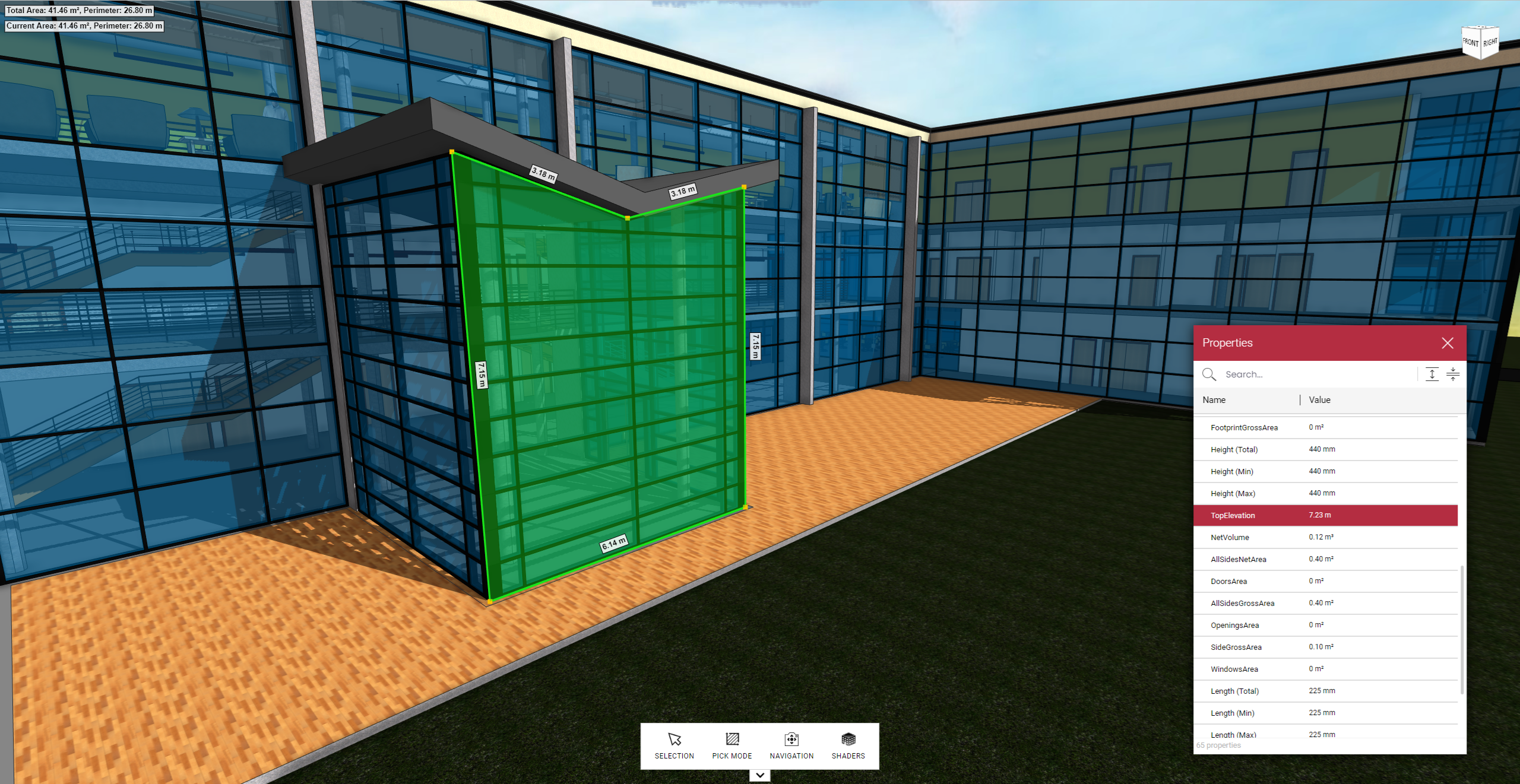
- Single Selection Modes - Elements, Faces, Lines, Points, Measurements (Areas, Points, Count Symbols)
- Rubberband Selection - Front Inclusion, Front Intersect, Deep Inclusion, Deep Intersect for Elements, Faces, and Measurements
- Bulk Operations - Highlights and dynamic colorization of Elements, Split Elements, Faces, Lines, Areas, Lengths, and Points
- 3D Transformation Widget - Out-of-the-box widget to move, rotate, and scale objects
- Split Objects - Knife, Scissors, and Cut Into Pieces techniques
📏 Measurements & Quantities
- Dynamic Measurements - Areas, Lengths, Points, Arcs with real-time updates
- GPU-Based Quantity Takeoffs - For Elements, Faces, Lines, Points, Measurements
- O-Snap Computation - Based on conceptual lines, points, and predefined snap symbols
- Real-Time Snapping - Quick Area and Quick Corner based on image recognition algorithms
- Extrusion Support - Create walls with opening areas on top of 2D drawings
🌍 GIS Integration
- GIS Ready - Synchronize cameras and visualize 3D/2D models in 3D or 2D maps
- Multiple Map Providers - Google, Bing, OpenStreet Maps, and ArcGIS imagery support
- Coordinate Transformation - APIs and UI to transform models using real-world GIS coordinates and elevation
- Terrain Import - Import geographic terrains into the 3D scene
- GIS Export - Export models to BimCT GIS Layers Server for external map layer tools
🌞 Lighting & Environment
- Photorealistic Sky Maps - Day and Night Sky rendering
- Sun Light & Shadow Maps - Sun, Sun-Light, Sun-Lens rendering based on angle to TrueNorth and Year-Day-Hour
- Animated Clouds - Dynamic cloud animations
- Real Geolocation - Sun position based on actual geographic location
🎭 Elements & Animations
- Static & Dynamic Elements - Support for both static geometry and animated elements
- Animation API - Animate objects using timelines with start, stop, pause, and resume controls
- Entourage Graphics - Billboards and high-quality textured graphics elements
- 2D Texture Planes - Overlay support for images and textures
🎨 Drawing & Markup
- 2D Text and Shape Vectorizer - High Performance for PDF Files using Text and Shape Vectorization
- 2D Drawing Overlay API - Text, Images, Markups, Labels, Polygons, Symbols, Pins
- Similar Image Detection - API based on image samples
- Image Recognition - Advanced algorithms for Quick Area and Quick Corner detection
- OCR Support - Scan text on any drawing part (3D or 2D)
🔄 Model Management
- Model Comparison - Side-by-side (split) or overlay mode
- Alignment API - Align models that are not aligned (federation support)
- Model Federation - Work with multiple models simultaneously
🥽 Virtual Reality (VR/XR)
- WebXR & OpenXR Support - Quest Link, Oculus Rift, Meta Quest 2, HTC Vive, and all WebXR-compatible headsets
- VR UI Rendering - Offscreen canvas and HTML/CSS rendering on 3D planes
- 3D Laser Pointer - 2D pointer projection on HTML5 elements rendered on planes
- Controller Visualization - Meta Quest controller and laser real-time visualization
- VR Movement - Teleportation and real-time movement support
🖥️ Web UI Components
- Design Tree Window - Optimized for thousands or millions of tree nodes without DOM overhead
- Ready-Made Windows - Properties, Filtering, Views, Sharing, Settings, Split Objects, Compare Models, Export GIS
- Context Menus & Toolbars - Implementing general actions to enable BIM features in applications
- Fully Customizable - All UI components are customizable and embeddable
Platform Support
WebGL 2.0
- High-level API - Very simple to use and embed, no 3D graphics knowledge required
- All WebGL2-compatible browsers - Chrome, Firefox, Safari, Edge and all major browsers
- Framework Ready - Works with Angular and vanilla JavaScript/TypeScript
- Fully documented - Complete JavaScript and TypeScript API documentation
- WebXR Support - All WebXR-compatible headsets (Meta Quest, HTC Vive, etc.)
- Out-of-the-box UI - Customizable UI components for design trees, properties, selections, settings, markups, and more
OpenGL 4.5
- Windows and Linux desktop applications
- Unbeatable desktop performance - Can draw a whole building with one draw call
- Maximum quality - Highest performance rendering
OpenGL ES 3.0
- Mobile applications - Android and iOS
- Cross-platform compatibility - Consistent rendering across devices
💡 Ready to get started? Check out our Getting Started Guide or explore the API Documentation.